
Download Apgar APK – APGAR Score Calculator, Neonatal Assessment Tool, Medical Software, Healthcare Utility
Overview
The Apgar App is a specialized medical tool designed to assist healthcare professionals in calculating the APGAR score of newborn infants immediately after birth. This assessment is a standard clinical practice used to evaluate the general health status of a newborn at one and five minutes post-delivery. The application streamlines the process by allowing users to input scores for five key indicators: Appearance, Pulse, Grimace response, Activity, and Respiration.
Each category is scored from 0 to 2, with a maximum total of 10 points. The app instantly calculates and displays the total score, enabling rapid clinical decision-making. A score of 7–10 typically indicates good health and routine care, while scores between 4–6 may require respiratory support, and scores below 4 suggest the need for immediate resuscitation.
The tool is intended exclusively for use by qualified medical personnel and is not suitable for personal or non-professional use. Its primary purpose is to enhance accuracy and speed in neonatal assessment during critical moments. The application is particularly valuable in high-pressure delivery environments where quick, reliable data is essential.
It supports clinical workflows by minimizing manual calculation errors and ensuring consistency in scoring. The developer did not provide additional information about the organization or development background. Real-world usage includes use in delivery rooms, emergency obstetrics, and neonatal care units where immediate evaluation of newborns is necessary.
Key Features & Capabilities
- Five-Parameter APGAR Scoring System – The app evaluates Appearance (skin color), Pulse (heart rate), Grimace response (reflex irritability), Activity (muscle tone), and Respiration (breathing effort) based on predefined criteria, each assigned a score of 0, 1, or 2.
- Real-Time Score Calculation – As each parameter is selected, the app automatically computes the total APGAR score, providing immediate feedback for clinical use.
- Medical-Grade Accuracy – Designed to reflect the standardized APGAR scoring protocol used in hospitals and clinical settings worldwide.
- Quick Access to Clinical Guidelines – The interface presents clear descriptions for each scoring option, reducing ambiguity and supporting consistent evaluations.
- Offline Functionality – The application operates without requiring an internet connection, making it reliable in clinical environments where connectivity may be limited.
These features support healthcare providers in delivering timely and accurate assessments during newborn evaluations. For example, a physician in a delivery room can rapidly input each parameter, receive the total score within seconds, and determine whether the infant requires additional care. The app’s structure ensures that no step is missed during the assessment, reducing the risk of human error.
The tool is especially beneficial in high-stress situations where speed and precision are critical. It does not include advanced analytics or data storage, focusing instead on delivering a streamlined, reliable scoring experience. The developer did not specify whether historical data tracking or export features are available.
The application is intended for immediate use and does not include user accounts or cloud synchronization.
User Interface, Workflow & Performance
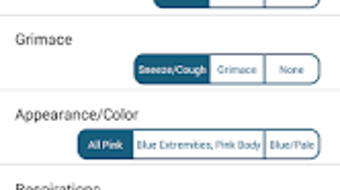
The Apgar App features a clean, minimal interface optimized for quick navigation in high-pressure clinical settings. The layout is structured around the five core APGAR categories, each presented with a labeled input field and a set of selectable options (0, 1, or 2). Navigation is linear and intuitive, guiding the user through each assessment step without distractions.
The workflow is designed to mirror the standard clinical procedure, minimizing cognitive load during use. The app does not include complex menus or settings, ensuring that users can focus on the assessment itself. The developer did not specify resource usage details, such as CPU or RAM consumption.
Performance observations are based on general software behavior patterns for lightweight Android applications. The app launches quickly and responds to input with minimal delay. Stability is assumed to be consistent with typical medical utility apps, though no user-reported crash rates or error logs were provided.
The interface is accessible on various screen sizes, but exact display compatibility was not specified. The application does not require user authentication or login, enabling immediate access. The design prioritizes usability over aesthetics, aligning with the needs of medical professionals who require speed and clarity during critical moments.
Compatibility & System Requirements
The Apgar App is available for Android devices and is designed to run on mobile platforms commonly used in clinical environments. The developer did not specify the exact minimum Android version required for installation. Installation size is not provided in the available information.
The app does not require a specific hardware configuration beyond standard Android device capabilities. Compatibility information was partially provided, with no mention of support for iOS, Windows, or Mac platforms. The application is free to download and use, and no licensing restrictions were detailed.
The developer did not list any system requirements related to processor speed, RAM, or storage. Exact performance details were not specified. Users are advised to ensure their device meets general Android compatibility standards for running third-party applications.
The app is intended for use in professional healthcare settings, and its functionality may vary depending on device capabilities and operating system updates.
Pros and Cons
Pros
- Fast, accurate APGAR score calculation in critical newborn assessments
- Designed specifically for medical professionals with a clear, focused interface
- Operates offline, ensuring reliability in low-connectivity environments
- Free to use with no in-app purchases or hidden fees
- Follows standardized clinical protocols to ensure consistency
Cons
- Available only on Android, limiting access for iOS users
- No data storage or history tracking features for longitudinal monitoring
- Developer did not provide system requirements or version compatibility details
- Limited to APGAR scoring—no additional neonatal assessment tools included
- No user accounts or cloud synchronization for team-based workflows
FAQ Section
Is the Apgar App safe to use in clinical settings?
The application is designed to support medical professionals in calculating the APGAR score according to standard clinical guidelines. It is intended for use by qualified healthcare providers only and does not replace clinical judgment.
Can I use this app on my iPhone or iPad?
The Apgar App is currently available only for Android devices. There is no official version for iOS platforms.
Does the app require an internet connection?
No, the app functions entirely offline, making it suitable for use in delivery rooms or emergency situations where internet access may be unavailable.
Is the app free to download and use?
Yes, the Apgar App is free to download and use. There are no in-app purchases or subscription fees.
How often is the app updated?
Update frequency was not specified. Users are advised to check their device’s app store for the latest version.
Final Thoughts + CTA
The Apgar App delivers a focused, reliable solution for healthcare professionals needing to assess newborns immediately after birth. Its streamlined interface, adherence to clinical standards, and offline functionality make it a valuable tool in high-pressure delivery environments. While limited to Android and lacking advanced features like data tracking or cross-device sync, it excels in its core purpose: accurate, rapid APGAR scoring.
The app is ideal for physicians, nurses, and midwives working in obstetrics and neonatal care. It enhances workflow efficiency and supports informed clinical decisions without unnecessary complexity. For medical teams seeking a dependable, no-frills tool for newborn assessment, the Apgar App stands out as a practical and accessible option.
Download Apgar APK now to access this essential medical utility on your Android device.






.png)
